

Approvals
Review what the Agent or an automation prepared, then approve, edit, ask again or decline.
When the Agent or an automation prepares an email or a change that needs a person, it waits in Approvals for you. Personal emails the Agent writes always wait here.
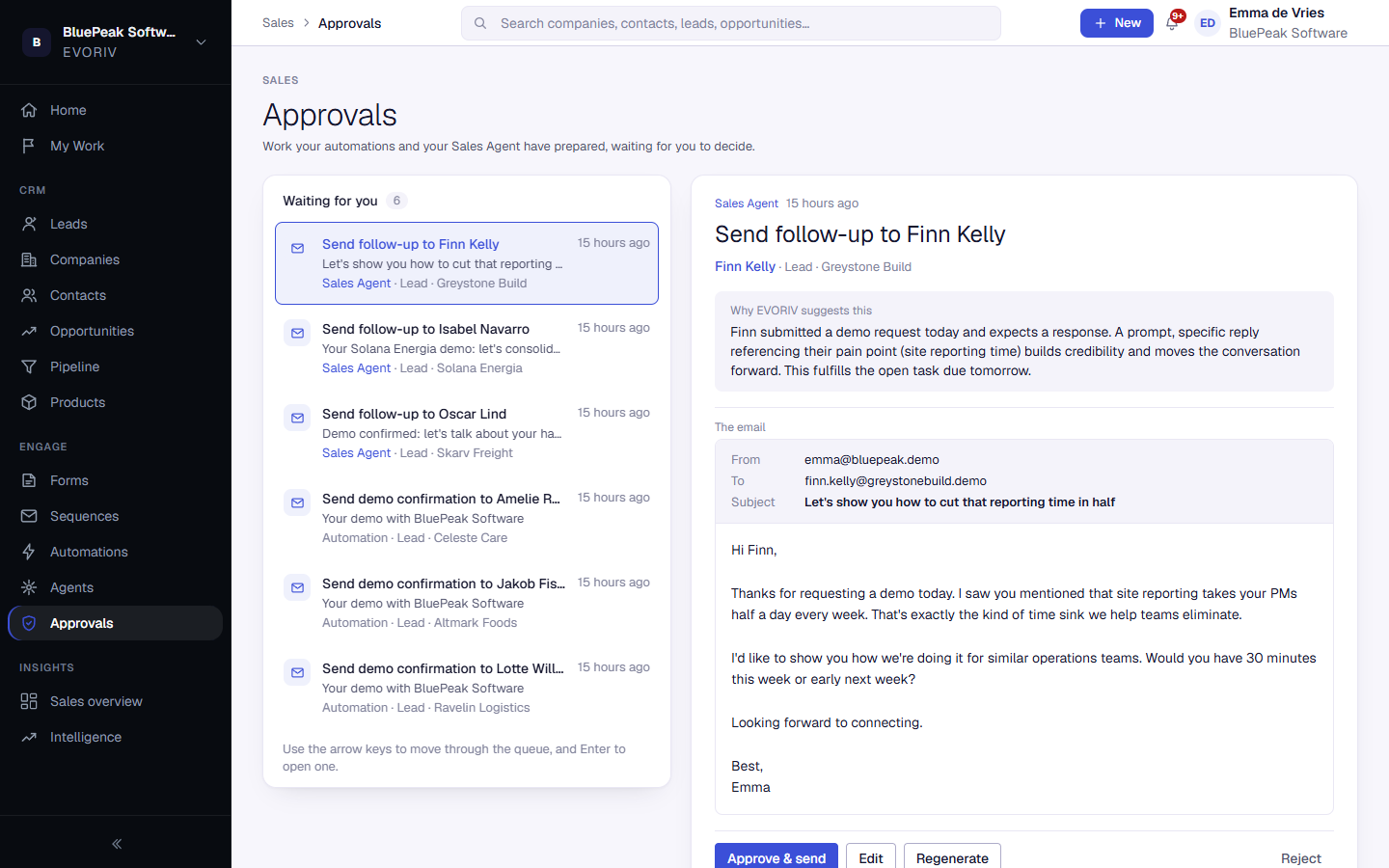
What an approval shows
The queue on the left lists everything waiting, with who or what prepared it. The selected approval opens beside it: Why EVORIV suggests this, the email exactly as it will arrive (From, To, Subject, message and signature) or the change it will make, and the recent activity on the record it is about.
Your options
- Approve & send: the email is sent as shown.
- Edit: change the wording, then Save wording.
- Regenerate: say what should be different and select Write a new draft. Only for what the Sales Agent wrote.
- Reject: nothing is sent.
After you approve or reject, the next approval opens straight away. Use the arrow keys to move through the queue and Enter to open one. Approvals also appear in My Work, so you see them wherever you start your day.